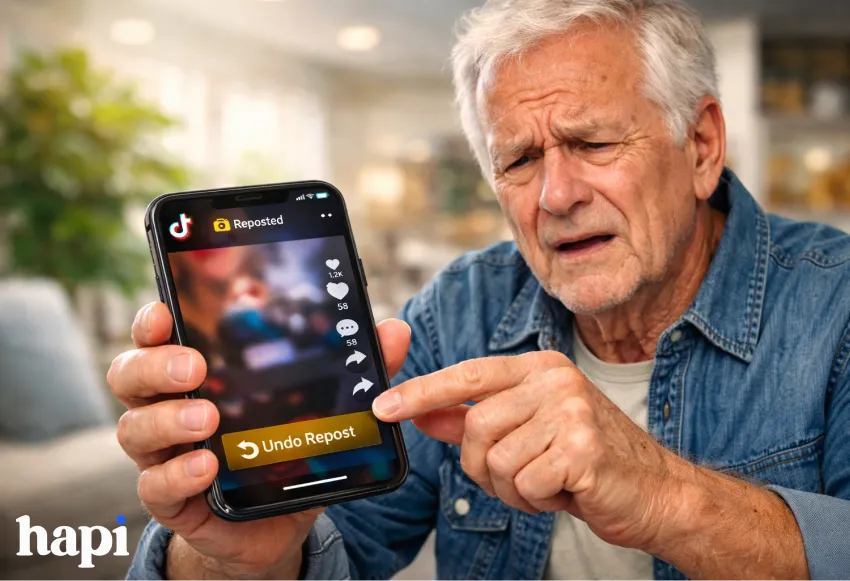
Did you accidentally share a TikTok post and now it appears wherever you didn’t mean for it to?
Don’t worry. It’s actually pretty easy to “undo” the repost on TikTok if you know where to tap on the screen.
In this guide:
- You’ll discover step by step instructions on how to un-repost content on TikTok.
- Find out what you can do if you can’t see the un-repost button.
- Understand what un-reposting means for TikTok
- how it impacts their algorithm as well as what you see on TikTok feeds.
All information presented in this guide is accurate according to the most recent TikTok trends and official guidelines.
What Does “Repost” Mean on TikTok?
Before learning how to remove a repost on TikTok, it helps to understand what reposting actually does.
A TikTok repost lets you reshare someone else’s video directly to your followers’ For You feeds. It doesn’t create a new video on your profile like a Duet or Stitch — instead, it boosts the original video while showing that you recommended it.
Think of it as TikTok’s version of a “retweet,” but with a few key differences.
Repost vs Other TikTok Sharing Options
- Repost → Shares the video to your followers’ feeds
- Duet → Creates a new split-screen video on your profile
- Stitch → Clips part of another video into your own content
- Favorite → Saves privately (no public sharing)
A repost is public, visible to your followers, and reversible which is why knowing how to undo a repost on TikTok is important.
Why You Might Want to Un-Repost a Video

Accidental reposts are incredibly common, especially for beginners. The repost button sits close to other share options, making it easy to tap without realizing it.
Here are the most common reasons people want to delete a reposted video on TikTok:
- You reposted the video by mistake
- The content no longer reflects your views or interests
- You didn’t realize reposts are public
- The video feels off-brand or irrelevant
- TikTok’s algorithm started pushing it too aggressively
Your reposts signal to the algorithm what you like to see and what counts as your interest on Tiktok, so they will impact your FYP. If you repost something but you don’t want to see similar videos like it then removing the repost immediately can help keep your algorithm to your personal liking.
How to Un Repost on TikTok (Step-by-Step)
This is the question most TikTok users are looking for, follow these easy-to-follow step by steps to remove a repost on TikTok using the mobile app..
Currently, TikTok only allows repost removal only through the mobile app.
Follow these steps exactly:
- Open the TikTok app and log into your account
- Locate the video you reposted
- You can find it in your Reposts tab on your profile
- Or scroll your Watch History if needed
- You can find it in your Reposts tab on your profile
- Tap the video to open it
- Tap the Share arrow (on the right side of the screen)
- Tap “Remove repost” or “Undo repost”
- Wait a moment for confirmation
That’s it, easy peasy. The repost is removed immediately and possibly will no longer appear in your followers’ feeds.
Tip: If you don’t see the option right away, you can try to close the share menu and reopen it again or scroll down a few videos and then go back to the reposted one.
Can You Undo a Repost on TikTok Desktop?
It’s at this point that many users get confused. Contrary to the mobile application, the computer (browser) version of TikTok does not currently give you the ability to remove reposts. Even though you are still able to find where the reposted content is, appearing either on your page or posted to your feed, the “Undo repost” function will not pop up, meaning you cannot delete the repost this way.
Desktop Workaround
The only reliable method is to use the mobile app:
- Open TikTok on your phone
- Navigate to the reposted video
- Follow the mobile steps to remove the repost
For now, mobile remains the only solution for undoing reposts, as TikTok has not added full repost management to the desktop interface.
TikTok Repost Not Working? Try These Fixes
If you’re searching for “TikTok repost not working,” rest assured, you’re not alone. There are some common problems that occur when users try to remove a repost, but there are easy solutions for these. Knowledge of why this may happen can save time.
Common Problems & Solutions
1. No “Remove repost” option appears
Sometimes the remove repost option doesn’t even appear. This is most likely because your TikTok app is outdated. You can solve this problem easily by updating your app to the latest version which makes everything go back to normal. Removing reposts wasn’t even an option for some of the older versions.
2. Can’t find the reposted video
If you don’t see your repost, you can either look through your Reposts Tab or sift through your Watch History to find it. If all else fails, you can try searching for the video by the name of the creator or the music/audio that was on the video.
3. Button doesn’t respond
The “Remove repost” button can be unresponsive sometimes. You can try force-closing the app, restarting your phone and then reopening TikTok. This simple act usually resolves this temporary UI glitch.
4. Repost still appears after removal
Even after you remove the repost, it may still be visible for a few more minutes in your follower’s feed or in your profile because of the cache. This usually clears up after a few minutes, but you can log out and then log back in to refresh the app.
Sometimes, glitches can happen, particularly after TikTok updates. In any case, provided you follow all these steps above, there should not be any issues in deleting the repost despite interface delays or an unresponsive button.
Common Misconceptions About Removing Reposts on TikTok
There’s a lot of confusion around reposts. Let’s clear up the biggest myths.
- Removing a repost deletes the original video
❌ False — only your repost is removed - The original creator gets notified
❌ No notification is sent - Undoing a repost hurts the creator’s stats
❌ Their views and likes remain unchanged - You can remove all reposts at once
❌ TikTok does not offer bulk repost removal
Understanding these points helps users feel more confident when they undo a repost on TikTok.
How Removing a Repost Affects the TikTok Algorithm
Curious users and creators may wonder: “If I remove a repost, will it affect the original video or my account performance?” Knowing how this is handled by TikTok will allow you to make informed decisions and steer clear of engagement troubles by mistake.
What Happens Algorithmically?

When you remove a repost, TikTok stops pushing that specific video to your followers through your account. This means your followers will no longer see the repost in their For You feed because your account is no longer signaling that it recommended the video. Removing a repost essentially withdraws your “endorsement” without affecting the original content.
Your interest signals, the information TikTok uses to suggest content—may also adjust slightly. For instance, suppose you have shared various fitness videos on TikTok and then decide to delete one of them, TikTok may slightly recalibrate the type of content it shows you and your followers. However, this effect is usually minor and won’t drastically change your feed.
The performance of the original video is not affected either. The likes, shares, comments, and reach for the original user remain unchanged. The removal of the share only affects how a user’s account interacts with this video.
Pros and Cons of Removing a Repost
Pros
- Better control over your feed and brand
- Prevents unwanted recommendations
- Fixes accidental engagement signals
Cons
- Any engagement already generated can’t be undone
- The video may briefly linger in feeds
Overall, removing a repost is a safe and normal action, TikTok does not penalize users for doing it.
Frequently Asked Questions (FAQ)
Can you un-repost a video on TikTok?
Yes. Open the reposted video, tap the Share icon, and select Remove repost.
Why can’t I undo my repost on TikTok?
Most commonly, the app needs updating or you’re using the desktop version. Repost removal works best on mobile.
Is there a time limit to remove a repost?
No. You can undo a repost at any time, as long as the option is available.
Can I delete someone else’s repost of my video?
No. You can only remove reposts made from your own account.
Does undoing a repost affect likes or comments?
No. Removing a repost only stops it from being shared through your account.
Final Thoughts: Take Control of Your TikTok Feed
Accidentally reposting a video happens to almost everyone — especially beginners. The good news is that TikTok makes it easy to remove reposts once you know where to look.
To recap:
- Reposts can be undone from the mobile app
- Desktop removal isn’t supported yet
- Removing a repost does not delete the original video
- The TikTok algorithm won’t penalize you
By learning how to un repost on TikTok, you stay in control of what your followers see and how your account is represented. One tap, problem solved.